

METROLift: Greater Houston Region Onboarding Guide
Earn up to $200 in bonuses.
- $50 for completing your first ride.
- Another $50 for completing 15 rides.
- Plus another $100 after completing your first 30 rides!
That’s $200 in bonuses and good work that makes a difference.
New Driver bonuses are good through January 7, 2026. Bonuses paid the first business day after ride completion. Please note that while rider no-shows do count toward your bonus count, rider and driver cancellations do not.
VIDEO: How to Onboard with UZURV
Watch this information-packed video, covering everything you need to know about the onboarding process. You will get answers to questions like…
- Who is UZURV?
- What do UZURV drivers do?
- What documents and requirements do I need to be a driver?
Onboarding Instructions – Step-by-Step
Complete Your Documents
In the Drive app, navigate to the Documents tab for your transit program. Here’s what you’ll see. Tap on each document to upload it to the app.

Important instructions for several documents:
Tap on each document name below to learn more about how to complete all requirements.
Provide Your Signatures
When you tap Signatures, here’s what you’ll see:
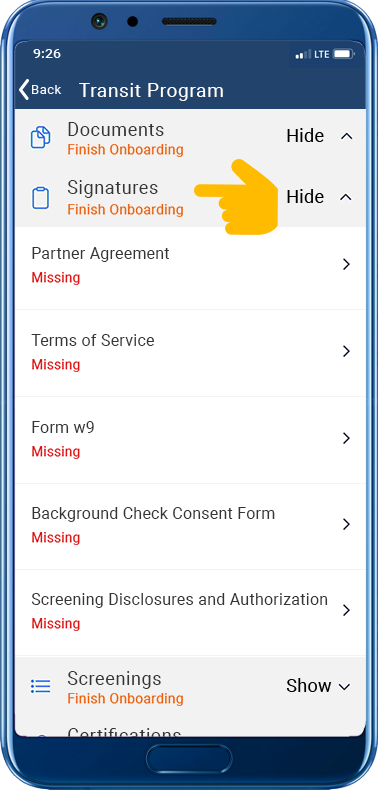
Click on each document to sign your:
- Partner Agreement
- Terms of Service
- Form W9 – be sure to enter your full legal name
- Background Check Consent Form
- Screening Disclosures and Authorization
- And any other documents listed
You must sign documents on your phone in landscape mode. Here’s how:
- Tap the document to sign.
- When you see the 3 dots, turn your phone sideways. A signature screen will appear.
- Sign the document, using your finger or a stylus.
If the signature screen does not appear when you turn your phone sideways, check your phone’s orientation lock in Settings and disable it. Then try signing documents again as described above.
STOP!
Do not move on until you’ve uploaded all required documents and provided all required signatures.

Complete your Screenings
Once all documents and signatures are reviewed and approved, we send you a screening package via text message and/or email. You will use the app to complete this. These screenings include….
- Criminal Background Check
- Motor Vehicle Record (MVR)
- Department of Transportation (DOT) Drug Test

Get your Certifications
After your screenings are clear, you’ll be able to access your certifications in the app. You’ll use the UZURV Learning Center to complete several courses. These are required and help you get certified to be a successful driver on UZURV’s platform.
IMPORTANT REMINDER: This program requires UZURV drivers to have at least 2 full, uninterrupted years to the month and day of verifiable driving history in the United States. If we cannot establish your driving history, we may request additional documentation.
- You mush have a valid US Driver's license from your state of residency
- Minimum Driver Age is 21 years.
- You must be able to communicate well using the English language.
- No rental or short-term lease vehicles.
- Vehicle must have at least 4 doors. No pickups or commercial vehicles!
- Vehicle must have seating and seatbelts for 4 to 7 people.
- Vehicle must be 2016 model year or newer.
- Vehicle must be clean and free of damage or large exterior branding or advertisements.
- Must have valid vehicle insurance (personal, not commercial) and registration, both from your state of residency.
- Must not have failed a Department of Transportation drug screening in the past two years.
If you plan to use a vehicle with any wheelchair access modifications (lifts, ramps, etc), please apply here.

FOR DRIVERS
© 2025 UZURV. All rights reserved